Showing posts with label pc. Show all posts

Wednesday, June 24, 2015

Best Games at E3 2015


Electronic Entertainment Expo, commonly known as E3, is an annual trade fair for the video game industry, presented by the Entertainment Software Association(ESA). It is used by many video game publishers and accessory manufacturers to reveal and advertise their upcoming games and game-related merchandise.

Sunday, June 14, 2015

Codechef

A platform for aspiring programmers to hone their skills
Codechef is a global competitive programming platform which supports over 35 programming languages and has a large community of programmers that helps students and professionals test and improve their coding skills.

Thursday, April 16, 2015

The Upcoming Amd GPUs of 2015

AMD is in the perfect position to capitalise on the recent PR blunder Nvidia has found themselves in with the GTX 970, with many opting to return their cards and jump ship to the brand new R300 series. But there’s no solid date yet, which has many wondering whether or not the trade in is even worth it. AMD wants you to hold out, because they’re so close to launch as one AMD Official said, “Hey mate, we don’t have an official date to share just yet but the second we know, we will definitely announce it on Facebook. We’re still putting the finishing touches on the 300 series to make sure they live up to expectation. Can’t wait to reveal them though. We’re pretty excited.”

THE Fastest Gtx 980.... Yet ..!!!!

Asus has been known for its custom PCB architecture and from the ground made custom GPUs. this year, it's its  20th anniversary.  and for that celebration, it took out a behemoth. The GTX  980 Gold Edition. 


  • Full Detailed View

Saturday, April 11, 2015

Facebook Launches Desktop Version of the Messenger:

Facebook launched a desktop based messaging website for users.It is available for all Messenger App users.

                                          website-messenger.com


User can chat with their friends by this Web site. You need a Facebook account to access this service.

A few months ago we saw that WhatsApp launched a web based messenger site for all WhatsApp Users.just like WhatsApp for Web ,Now Facebook Launched its messenger App for desktop users.Most of the mobile App features are available here (audio, voice calls, photos and stickers).

So what is the need of the new service? How it is different from the regular chat box ?


Facebook says this service is most helpful for busy users, who just use Facebook to talk with their friends. They can avoid the other Facebook content. This messenger service is consuming less data than the main site.It is Faster then main site.


This site looks simple. All the previous chat shows in left side of the website and a large chat threads on the right. You can search and send a new message to a friend by a small search box on the top - left corner.


previous post : 


 ASUS ZENFONE 2


Join our Facebook Page :TECHSOLUTION

Thursday, March 19, 2015

Future of Computational: Cognitive Computing

Cognitive computing :


We are going to enter a new period of computing- cognitive computing.

Cognitive computing systems like IBM Watson, are able to think and learn, understand natural language, and interact with humans more naturally.

Cognitive computing is able to solve new kinds of problems. It can also handle problem like human beings. 
Cognitive computing makes context computable. They can identify and extract contextual features such as hour, location and tasks. 
Cognitive computing redefines the relationship between human and machine's. They can play the role of your coach in daily life. Their output may be suggestive, informative, entertaining.
Cognitive computing is smart enough to make decisions himself for a particular purpose.

The cognitive computing device must be:

Adaptive :
They must learn from the information. And make changes for the goal. 
They must be engineered to take action in real time. 

Interactive :
They must interact with a user easily. They must understand user needs. They must interact with other devices and the Internet. 

Contextual :
They must understand, identify, and extract Contextual meaning.


This system has their own decision making capabilities. Decisions made by cognitive computing system are information based. These systems can discover insights that could not be discovered by humans.

They help humans to make better decisions by penetrating the complexity of problems. 

previous post : MACKBOOK 12"
                       ASUS ZENFONE 2

for more information visit Facebook page :TECHSOLUTION

Saturday, February 21, 2015

The Best Web Browser!!(2015)


The Best web browser of 2015 .we run the Banchmark in 5 web
browser's the result also depand on the system confiuration.
you select which one is the best. 
GOOGLE CHROME 
SAFARI
FIREFOX
VIVALDI
INTERNET EXPLORER

BANCHMARK:

peacekeeper browser test:
http://peacekeeper.futuremark.com/
1.FIREFOX---------3008
2.VIVALDI---------2626
3.GOOGLE CHROME--------- 2579 point
4.INTERNET EXPLORER--------1434
5.SAFARI----------1416

JavaScript benchmarks:
https://developers.google.com/octane/
1.GOOGLE CHROME ------29,479
2.FIREFOX-------27,588
3.VIVALDI-----17,532
4.SAFARI-------16,405
5.INTERNET EXPLORER----16,178

HTML5 TEST:
http://html5test.com/
1.VIVALDI--------511
2.GOOGLE CHROME -----501
3.FIREFOX-------449
4.INTERNET EXPLORER------343
5.SAFARI--------250

security test:
http://www.browserscope.org/security/...
1.VIVALDI--------16
2.GOOGLE CHROME ------16
3.SAFARI--------14
4.INTERNET EXPLORER--------14
5.FIREFOX-------13

tests are run on windows 8.1 pro .
BEST Web Browser 2015

VIVALDI and GOOGLE CHROME

The Best Cloud Storage Solutions

The ability to back up files, store them in the cloud, and automatically sync all that data across multiple devices has radically changed the way we use computers, mobile phones, and other Internet-connected devices. That data could comprise home movies, your personal music collections, or work files that you and a colleague are collaboratively editing together. No matter what you put into a cloud storage and syncing solution, the benefit of being able to access it nearly anywhere is phenomenal.
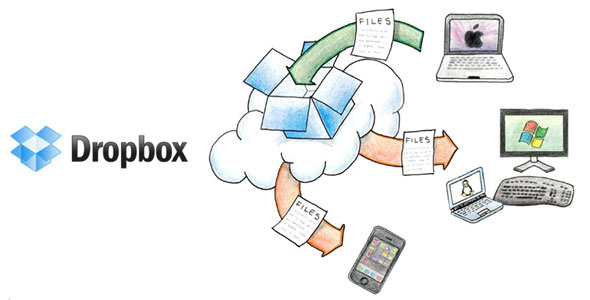
Dropbox:
 Dropbox remains a superbly implemented, cloud-based, automatic, file-synchronization service that's ideal for accessing and sharing data from nearly anywhere. You only get 2GB free to start, but you can earn more space through referrals and other tasks. 
Available onWindows, Mac, Linux, Web, Android, iOS,BlackBerry, Kindle Fire

Saturday, February 14, 2015

Slow computer!! ways to make it run faster


Install a solid state drive
Hard drives are the biggest cause of slow speeds and especially slow startup speeds on your PC.
installing a solid state drive, which have extremely fast read times.

More hard drive storage

Even if you make sure to regularly clean out all your temporarily files, if your hard drive becomes 85 per cent full, it’s going to affect your computer’s speed.install a bigger hard drive (1 or 2 tb).

More RAM

A clear indicator of not having enough RAM is if your computer slows down every time you try and process large files, or it freezes will carrying out several different actions at once.practical terms 4GB is more than enough for most people.

Run a disk defragment

Go to “My Computer”, right-click on the hard drive and select “Properties”. Under the “Tools” tab there should be an option to “Defragment Now”.

Run disk clean up

Open Disk Cleanup by clicking “Start > All Programs > Accessories > System Tools > Disk Cleanup”. 

Hoovering out the dust

dust is your computer’s enemy. It can impede airflow, which is vital to keeping your computer’s temperature down.

Uninstall unused programs


Some programs even run background processes when you load your computer, even though you are not using them.
To remove all these pointless programs, open the Control Panel’s Programs and Features page, and have a trawl through the list of installed software. Uninstall those that you do not need.
Automatically delete temporary files
To do this, open “My Computer”, and select your local drive (usually C:\). Select the “Windows” folder and then open the folder titled “Temp”.

Prevent unnecessary start ups

To do this, click “Start” and “Run”. In “Run”, type “msconfig” and then press enter. You should then see the “Startup” tab, with all the programs ticked the ones which will load upon your computer starting up.